















Homewood City Schools implemented a new emergency alert system to maximize school safety in preparation for the spring semester.
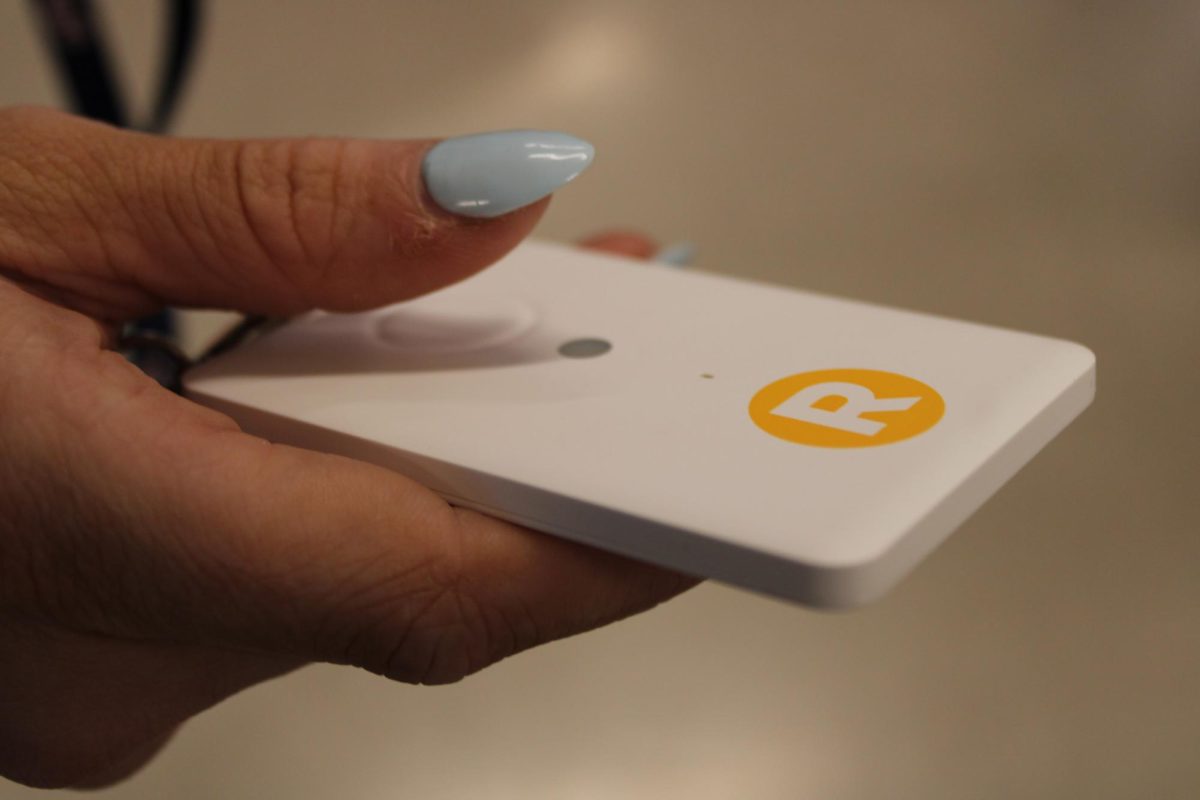
The Raptor technology is a new security feature designed to communicate with administrators as quickly and efficiently as possible. The emergency alert feature is a button on a white card, similar to a keycard that is connected to the Raptor Alert app, to ensure immediate notification.
HHS principal Joel Henneke helped make decisions about the new alerts.
“It’s not a panic button,” Henneke said. “I would call it an emergency alert or assist button. It’s part of an emergency response system.”
Front office secretary Je’lyn Hunter manages school traffic, assists students and parents and interacts constantly with visitors, bringing a helpful presence to the school. Hunter will now be notified about an emergency faster, providing a higher probability of safety.
“Now having the button, it doesn’t just call your admin or faculty, it also calls the police,” Hunter said. “It’s way better for safety.”
Along with the card, faculty have an app for both specific and broad emergencies, to activate an alert on the phone.
Minor alerts cause minimal disturbance, as major emergencies notifies all faculty and police.
“There is a big alert, the lockdown one, where everyone gets alerted on that,” Henneke said. “But if it’s just a team assist, like I need an administrator, nurse, or there’s a fight, they don’t lock the whole building down; not everyone gets that notification.”
Raptor enables quick communication for emergencies through the button, and app, ensuring that staff will be aware of any situation.
“It comes through even if your phone is on ‘do not disturb’,” Hunter said.
Minor emergency options in the app include student behavioral assistance, administrative assistance, medical assistance and suspicious activity. Major emergency options include secure, lockdown, evacuate, shelter and hold, shown through large buttons on the screen.
“You can use the app like a remote call button, or you can use this card-like device to help,” Henneke said, gesturing to the card on his lanyard. “All the faculty staff had to download this, so that when someone pushes it, they all get a notice on the phone which is a great feature than calling and telling someone.”
Different “code taps” represent a different call for help. three presses may alert for medical assistance while seven presses activate lockdown.
“It really has to do with how many times you press it,” Henneke said. “This is one way of calling for help, and depending on what’s going on, determines how many times you activate it.”
In addition to code taps, district leadership analyzed sensor options to optimize Homewood City School’s safety in all areas.
“Dr. Hefner, Dr. Barnes, district leadership, have been looking at these things for quite a while,” Henneke said. “There were different products out there, and they have been doing research this fall, checking things out, finding what’s a good fit for our school system and how it has enhanced school safety overall.”
An alert reveals the person who has triggered it, and their location on the Raptor Alert app.
“There are sensors, they are not in every single room, but throughout the building so that when there is activity it sends a signal,” Henneke said. “It triangulates through the sensors to pinpoint where your location is.”
The sensors alert students and faculty through flashing lights and alarm noises, similar to a fire alarm.
“They mapped out the school and put it where they needed to be, to ensure that there was coverage everywhere,” Henneke said.
During winter break, faculty came to school the day before students did and were trained how to use Raptor Alert and code taps.
“One of the things we [faculty] did was a training about these [emergency alert button],” Henneke said. “The type of activation you engage in, and that was part of the training with the faculty and staff.”
Before the Raptor system, safety measures involved taking precaution in locking doors on both sides, along with evacuation plans, code systems and contact information to quickly call school resource officers.
“We had walkie talkies, and we had them in the main area, the front office, back office, nurses offices, and we could press those buttons quickly, to call for help,” Hunter said.
The new alert button is easy to press.
Henneke hopes for faculty to feel at ease with carrying their own card.
“My hope is for faculty to get comfortable with it,” Henneke said. “I want our faculty to feel comfortable with having it, not being nervous to touch it. It’s fine, it’s a resource.”
The immediate notification reassures faculty, knowing they have a quick way to reach out if they need something.
“I think it’s definitely reassuring for teachers because we can go in flight first, before alarming students,” Hunter said.
Emergency announcements during drills or real life situations will still happen, along with ParentSquare and StudentSquare notifications, in case a faculty member is unable to access a phone.
“We will still have the intercom part of it, but this [emergency alert button] is just a quicker way to let faculty staff know immediately,” Henneke said. “If someone had activated the lockdown, I would get on the intercom and let everyone know we are on lockdown.”